Announcement

Collapse
No announcement yet.

Keyboard Fun

Collapse
This topic is closed.
X
X
 
  • Filter
  • Time
  • Show
Clear All
new posts

  • Shalom
    replied
    Quoth protege View Post
    Reading this thread...I noticed that I'm using a Model M at work. I've had it at *least* 12 years (since I started )...and it's held up well. Slightly grubby, but it works like it's supposed to. I can't make that claim with the expensive wireless keyboards attached to the other computers in the office. Those things are shit!
    Model M's are all dated on the bottom. Turn yours over and check the date; you may be surprised.

    My home keyboard is a Northgate OmniPlus 1. My father got it at a show somewhere, but it wouldn't work with his PC/AT (which tells you how old the damn thing is) so I wound up with it and haven't let go. It's outlasted four motherboards thus far. It's even bigger than the standard Omnikey Ultra: it's got (counts...) 119 keys. No shit.
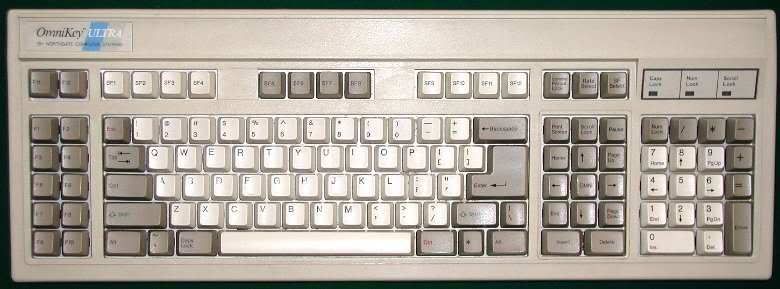
    I know it says "Omnikey Ultra" on the top, but this is the Plus version, with the weird cursor key layout. (Seems this version was intended for use with Amigas... ) Note that key marked "OMNI" in the middle of the arrow key layout. Supposedly that one's programmable, if you have both the software, and a 5¼" floppy drive to read it on; I have neither at the moment, so it basically acts as a second ↓ key. Note also that the Ctrl key is where God intended it to be, to the left of the A key, and the caps lock key is down at the bottom where it doesn't get in your way. Note that lovely oversized Enter key. Fn keys down the side, Shift/Fn keys across the top (can be changed to Alt/Fn if you want). Programmable key-repeat rate. Nice loud clackety noise. I love it.

    (Of course it needs a 5-pin DIN socket. Fortunately I got an adapter for that while they were still available.)

    Leave a comment:


  • protege
    replied
    Reading this thread...I noticed that I'm using a Model M at work. I've had it at *least* 12 years (since I started )...and it's held up well. Slightly grubby, but it works like it's supposed to. I can't make that claim with the expensive wireless keyboards attached to the other computers in the office. Those things are shit!

    Leave a comment:


  • csrindy
    replied
    Toshiba Laptop FTW! I find it really hard to use regular desktop keyboards after getting used to my laptop

    Leave a comment:


  • Chromatix
    replied
    Cherry do make several different types of PC keyboards, at dfferent price points and quality levels. Some of them are standard membrane keyboards, relatively well made by membrane standards, but with the same problems as every membrane keyboard ever has.

    The G80 series - not to be confused with the G81, G83, G84 or G86 series - is the one to ask for, but bizarrely it is also the one that's hardest to find. But they really do last for decades. It really doesn't help that, at least on Amazon, the descriptions are incomplete and inconsistent - what I need to know is what series it is from, what connector it has for the computer, and what layout it uses (US, UK, EU, DE, FI...). I eventually had to resort to deciphering the model numbers.

    I already use a Model M at work and I have a second one, with a bad cable and one missing keycap (an unimportant one), at home. Sometime I will probably get around to making the USB controller boards for them, which will make them considerably easier to use. I was lucky though - I found them at a computer fair for £1 each, while I was scavenging to build an ultra-cheap internet computer for someone. Silly me bought two just in case I needed to make one good one out of parts of each. Given some of the other hardware I had to work with - including a hard disk which had one bad head, and thus only 45MB instead of the specified 60MB - I was probably justified at the time.

    My keyboards are already ordered and on their way, so I don't actually need help in getting them. I just wanted to rant about how little attention people pay to one of the most important parts of their computers.

    Oh, and I am aware that good-quality laptop keyboards exist - the problem is that so many laptops come with extremely bad ones, and it's not something you can just replace as with a desktop computer. On the plus side, reviewers also usually point out the really bad ones.

    Leave a comment:


  • Naaman
    replied
    Quoth Chromatix View Post
    As an aside, they also carry the relatively new Razer Black Widow keyboard. This uses the same keyswitches as the Cherry G80 - probably bought directly from Cherry - and while costing more than the G80, does have a few extra macro keys and the ability to disable the Windows key.
    I'm a gamer keyboard snob and managed to get my hands on a Black Widow (the non-backlit version), the keys are pretty light to the touch (25g) so you don't get that really solid *click* like you do with the M series, if you touch type though they're perfect. My main gripe with it is that it takes time to re-orient yourself to the left hand side, I keep stabbing the m5 key instead of CTRL (there's a vertical row of macro keys on the left hand side). The font - you kinda get used to that and (for me) it's kinda good to have the 'odd' european characters with just two key presses.

    I used to use a Logitech Wave which I liked, it's not quite a natural keyboard but is really comfy for extended periods of time, that also has the option to turn off or remap the windows\Caps Lock keys reliably (I use a Microsoft keyboard at work and the software spazzes every now and then, it manages to turn the Caps Lock back on intermittently - their s\w sucks, hardware's fine)

    Leave a comment:


  • lordlundar
    replied
    Quoth roothorick View Post
    Cherry, heh. Their main business is arcade spec microswitches. I'm talking about the kind that goes in plastic foot sensors on games like Spider Stomp -- they take hundreds of Gs of force BY SPEC. If they can't make a nice keyboard, no one can.
    Then the keyboards I dealt with must have been their budget effort work. (did a series of IMAC work for a bank a couple of years ago and the cherry ones were barely functioning and only about a third of the ones we replaced. The others had died some time before we got there)

    Leave a comment:


  • roothorick
    replied
    Cherry, heh. Their main business is arcade spec microswitches. I'm talking about the kind that goes in plastic foot sensors on games like Spider Stomp -- they take hundreds of Gs of force BY SPEC. If they can't make a nice keyboard, no one can.

    I'm definitely firmly planted in the Model M camp. I have a Lexmark-made unit on my desk right now. This thing has fought walls -- and won.

    I don't know if I'd pay much for one though. If you're in a position where you can pick at computer waste, you'll have a couple working Ms on hand after only a few months.

    Gaming keyboards are 95% hype. Their "optimized layout" takes time to learn, and still leaves you behind the players with buckled-spring boards. The BlackWidow sounds like an exception, by the marketing materials, but I've never seen one in person.

    (Actually, the BlackWidow is around the same pricepoint as Model M replicas and clones, so if you're a gamer and buying new, it's definitely something to seriously consider. But ask around for "old IBM" keyboards first, there's a good chance someone nearby has one they're willing to part with for cheap or free.)

    Leave a comment:


  • lordlundar
    replied


    I'm sorry, but for some of the pricing I've seen on those pages, those keyboards had better be able to punch holes in brick walls and still function. (okay, granted the Model M could do that, but some of those others are no where near that level. And yes, I've dealt with Cherry keyboards. Durable, but not solid enough to justify over $100 in my mind.)

    Call me a n00b if you want, but I'm not about to spend that kind of money on a basic keyboard unless I can count it's longevity in decades. The click just isn't worth that kind of dough to me.

    Leave a comment:


  • It's me
    replied
    If you are looking for inexpensive but good keyboard, check out Value Village and similar used-stuff stores. I've managed to pickup three IBM M2 keyboards that way. The M2 is a lighter/smaller version of the Model M, but it does have buckling-spring keys.
    http://www.clickykeyboards.com/index...parentcat/9245

    Leave a comment:


  • Andara Bledin
    replied
    Quoth Ravenzfire View Post
    There is a very tactile feel to pressing keys and a destinct click so while different I find I can actually type easier and faster.
    Exactly! With a good keyboard, you don't have to worry about mashing the keys quite so much.

    I've got a fairly bleh Dell keyboard I picked up for $12 on my home computer, and there is no actual indication for when I've hit a key hard enough. However, the springs are so very light on it, that practically any pressure goes straight to the base, so it's moot. But it does give them a slightly mushy feel, which is a bit annoying.

    ^-.-^

    Leave a comment:


  • Jack
    replied
    I used to use Model Ms but then got a Happy Hacking Keyboard Pro 2 and I'm now hooked on Topres. You guy should check out GeekHack. Good resource.

    Leave a comment:


  • Ravenzfire
    replied
    I was recently in the market for a new keyboard due to the steelseries one I had wearing itself out. I looked around to see what was out there and really there are very few companies making decent keyboards. I do a lot of gaming on my PC so I was looking for something in that realm. Looked at the logitech keyboards out and almost went with them but decided to give the Razer Black Widow a shot. I'm pleased for the most part, although I kind of have the same issues as the OP with the strange font and the de-emphasis on symbols on the keys. The keys are backlit but only letters and numbers. So if you are playing in the dark (which I a lot, hence wanting the backlight) it can get annoying if you are trying to find a specific symbol.

    It's a nice keyboard though and I'm pleased with the purchase. It's my first mechanical keyboard which takes a little getting used it. There is a very tactile feel to pressing keys and a destinct click so while different I find I can actually type easier and faster. I haven't messed with the macro keys yet but the Razer programming software is pretty easy to use in past experience. It is a little on the pricey side but in the end it was worth the purchase.

    Leave a comment:


  • Andara Bledin
    replied
    I want to know why it's so difficult to find a basic, no frills, spring & click keyboard?

    I just want, well, the same sort of thing I'm typing on right now, which is an IBM KB-9910.

    Just the basic 104 keys, no ergonomics (I despise ergonomic keyboards), a standard attached keypad, and crisp tactile response. The crisp tactile response is vital to my typing speed. I don't care if it makes noise or not, but I have to be able to feel precisely when I've pressed the key hard enough for it to register.

    It's hard to find a decent quality keyboard that doesn't also cost an arm and a leg and also doesn't have a gajillion buttons I will never use. Oh, yeah, and is a basic rectangle shape. What's so difficult about a basic rectangular shape that so many keyboards have to be wavy or curved or otherwise take up more space than they actually require?

    ^-.-^

    Leave a comment:


  • Raveni
    replied
    Quoth Chromatix View Post
    As an aside, they also carry the relatively new Razer Black Widow keyboard. This uses the same keyswitches as the Cherry G80 - probably bought directly from Cherry - and while costing more than the G80, does have a few extra macro keys and the ability to disable the Windows key. What turned me off it, however, was the strange font they use on the keycaps, and the clearly deliberate de-emphasis of the symbols which I need for programming. If you're not a programmer, that might not matter to you as much as the availability of backlighting or the allegedly optimised-for-gaming key matrix.
    I picked up one of these recently for my personal machine at home... The letters rubbed off the WASD keys on my old keyboard. The new one works great!

    And as I sit here at work on an aged Microsoft erganomic keyboard, I think that I might need a new one here, but don't think that would be the right one for the office. Some of my clients might think that I spend my time playing games...

    Leave a comment:


  • Setsunaela
    replied
    I love the click of a keyboard. I guess because despite being only 23, I learned to type on a REAL typewriter. Not electric, the kind with an ink ribbon and keys that got jammed if you weren't careful..
    it doesn't feel right typing on my laptop's integrated keyboard, with its silence and smooth barely-raised keys..
    edit: I also used to have one of those cherry g80 keyboards, I loved that thing. My grandma threw it away because it was "older than god"

    Leave a comment:

Working...
X