Announcement

Collapse
No announcement yet.

The Vintage Computer Appreciation Thread

Collapse
This topic is closed.
X
X
 
  • Filter
  • Time
  • Show
Clear All
new posts

  • #61
    Quoth RichS View Post
    I found out that there isn't a lockout chip per se on the TI 99/4A; it's a different BIOS. TI wanted to discourage 3rd party software, so they updated their BIOS to lock out 3rd party software. If your TI 99/4A is running version 2.2, date of 1983, then it has the updated BIOS, like here.

    People found out how to get around this - the computer just had to be reset while the cart was plugged into the computer. Users modded their computers to have a reset button, adapters were made to plug between the cartridge slot and the cartridge, and software manufacturers made reset buttons on the carts. Ironically, lack of 3rd party support was one of the issues that killed it...

    I have 2 3rd party carts, one that doesn't have the reset and I can't use, and one that does. Instead of messing with my computer, I'll be searching for an original 99/4A.
    Funny that we were talking about TI stuff and third-party software for it, as I just picked up a rather well-equipped TI-99/4A system, along with some third-party carts! It's an original silver model, and came with a few dozen cartridges, including some by Atari, Parker Brothers, and some oddball company called Romox. Included with it was a Peripheral Expansion Box, loaded with a series of add-on cards (32K RAM, disk controller w/ drive, RS-232 interface). Should be fun!

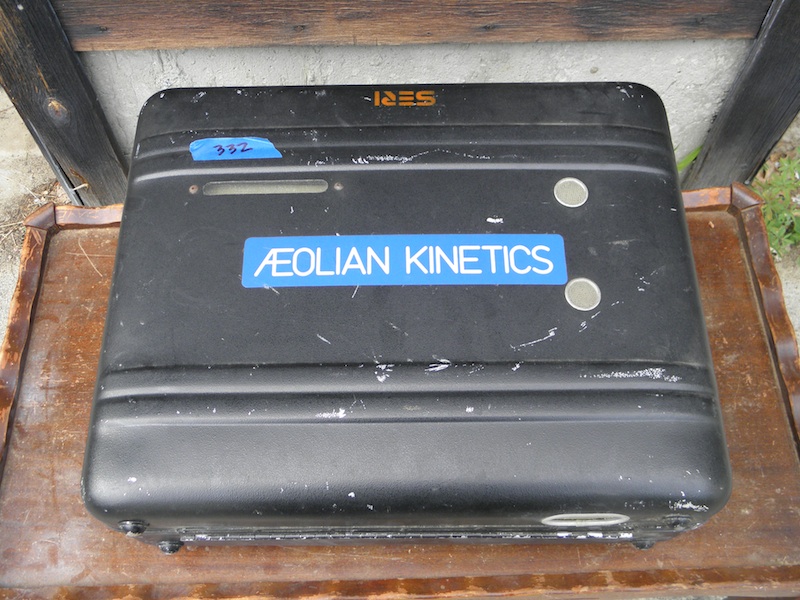
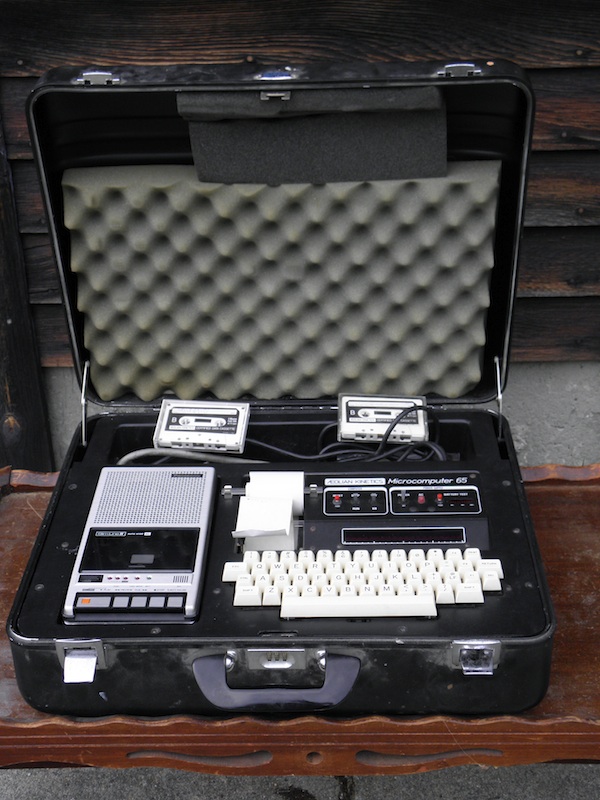
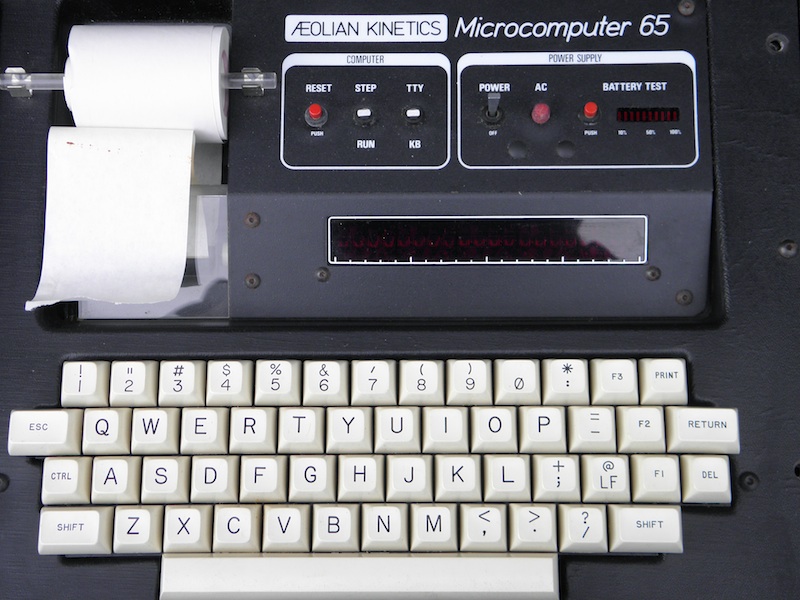
    In other news, I picked up another oddball computer last month that I'd been too busy to post about here. It's a Rockwell AIM-65, re-branded/packaged by a company called "Aeolian Kinetics" as the "Microcomputer 65". It was intended to be used as part of their PDL-24 Monitoring System, meant for maintaining solar heating systems or somesuch. Hopefully, it can be made to work for general purpose computing as well. Anyway, here are a few pics:
    Goofy music!
    Old tech junk!

    Comment


    • #62
      It'd be interesting to see if that computer can do. On the 99/4A, I think I've found an original silver model, just hope it stays available 'till Friday.

      I spent my weekend working on my C64 drives. I now have one working thanks to alignment and cleaning of the head, one sorta working that I'll do the same cleaning/alignment, and one with a main board that's weird.

      It has 2 wires soldered on the board that lead to a headphone jack-looking connector mounted on the right side of the front of the drive. When I have the drive plugged in and connected to the computer, I can't access it - the computer says that the drive isn't connected. I'm assuming that the setup was a security feature, and that a 'key' would have to be inserted into the jack for the drive to function. Mechanically, the drive works.

      Good news is that I'm surprised how much of the floppies I have still work. I've only been through 1/8th of them so far. I was also surprised to find a cassette in my tape drive. Don't know what's on it yet, or even if the drive functions.

      I also have a VIC-20 with a bunch of carts, including a 16k RAM cart, but I don't know if it works and it's missing keys. If it does work, I could probably swap out the keyboard for one of my C64 parts comps. I need to see if the power supply from the C64 would work with the VIC-20.

      Comment


      • #63
        Quoth RichS View Post
        It'd be interesting to see if that computer can do. On the 99/4A, I think I've found an original silver model, just hope it stays available 'till Friday.
        Yeah, I have to open it up and check on the battery backup system it uses. Hopefully, it hasn't leaked anything onto the computer. As for the TI-99/4A, if that deal falls through, I might have something for ya...

        Quoth RichS View Post
        I spent my weekend working on my C64 drives. I now have one working thanks to alignment and cleaning of the head, one sorta working that I'll do the same cleaning/alignment, and one with a main board that's weird.

        It has 2 wires soldered on the board that lead to a headphone jack-looking connector mounted on the right side of the front of the drive. When I have the drive plugged in and connected to the computer, I can't access it - the computer says that the drive isn't connected. I'm assuming that the setup was a security feature, and that a 'key' would have to be inserted into the jack for the drive to function. Mechanically, the drive works.
        Good to hear that you got most of them running again. As for the modified drive, my guess is that it has something to do with the drive select circuitry. Exactly what they used a jack for, I have no idea, but I have a drive which was modified with a toggle switch to select between devices 8 and 9. See if that drive is addressed as drive 9; if not, check this document, and see if the wiring corresponds to what's shown. If worse comes to worse, you can probably trace the schematic in the service manual, and figure out where the wiring goes. I highly doubt that that jack is part of any sort of security scheme, but who knows.

        Quoth RichS View Post
        Good news is that I'm surprised how much of the floppies I have still work. I've only been through 1/8th of them so far. I was also surprised to find a cassette in my tape drive. Don't know what's on it yet, or even if the drive functions.

        I also have a VIC-20 with a bunch of carts, including a 16k RAM cart, but I don't know if it works and it's missing keys. If it does work, I could probably swap out the keyboard for one of my C64 parts comps. I need to see if the power supply from the C64 would work with the VIC-20.
        Yep, the old disks often still work, as long as they've been taken care of. The tape probably still works as well, methinks, and I wouldn't be entirely surprised if the drive was OK (might need a belt or something, but that stuff was generally pretty rugged). Plug it into the computer, hit the play button, type LOAD, and see what comes up.

        The VIC-20 stuff is pretty cool. The C=64 keyboard should be a direct match for it (at least some of the C=64s used VIC-20 keyboards with the tan function buttons; I have one like that). As for the power supply, if your VIC-20 is one of the versions with a DIN-type power connector, a C=64 power supply will work just fine (the reverse wouldn't be true). If it has a two-prong jack, it shouldn't be too hard to wire up a 9VAC 2-3A transformer to power it (the first VIC-20s had the DC part of the power supply inside the unit). More info available here. Good luck!
        -Adam
        Last edited by AdamAnt316; 07-13-2016, 04:42 PM.
        Goofy music!
        Old tech junk!

        Comment


        • #64
          Well, this is interesting...

          Bad news - I fried one of my C64s testing power supplies. I have 2 extra, and tried one with my original C64. It came one, but the READY came up as weird symbols, so I turned it off. Tried to power it on with that and the supply from my newer C64D, and no go. My tape drive turned out to be non-working also; tried with both C64s I had before the whole power supply fiasco, and it wouldn't power on.

          This turned out to be a blessing, because I discovered a forgotten stash of C64 part computers in a tote. Out of the 5, 2 were incomplete, 1 non-working, and 2 working. 1 had a messed-up keyboard, the other was actually in pretty good shape except missing some rubber feet. Took the mainboard out of the messed-up keyboard one and placed it in the one I fried, and now I have 3 working C64s! Not only that, I took the one good keyboard I had left and replaced the one from the VIC-20 with it. Only problem with the VIC-20 is that it's the older 2-prong power connection and I don't have a transformer, so I still don't know its working condition.

          Bonus - I also found another 1541 disk drive. This one looked brand-new, so I wondered why it was in this tote. Plugged it in and tried to read a disk, no go. Figured that I'd open it up and see if I could get it to work. First thing I noticed was that it took a hard hit on the back; the plastic housing was OK, but the steel frame had a dent close to the fuse and electrical outlet. Second was when I removed the drive housing from the bottom case, there was a pulley just lying there. Somehow, the drive pulley came off of the drive. So, I took the drive out of the housing, screwed the pulley back on tight, put the drive belt on, assembled it back, and gave it another go.

          It works like a new drive. Games/programs I couldn't load with the other 2 drives work with this one. I even gave it a sort of torture test; I found a working copy of Jumpman. This game was really dependent on the drive, loading each level from its disk. I played one round on Randomizer, and was really surprised at how the drive was working with the game, how fast it was in loading the levels. It even saved my score to the disk.

          So, I now have 3 working C64s (2 orignal, 1 C64D), 3 working drives (2 that need some fine-tuning), and a bunch of programs/games. Only 1 power supply, so I'll have to be looking at getting at least 1 for the C64 and 1 for the VIC-20. It'll have to wait a bit, though. Think I'm going to finish out the week just going through my disk stash, then I'll be on to my TI99/4A.

          Comment


          • #65
            Quoth RichS View Post
            Bad news - I fried one of my C64s testing power supplies. I have 2 extra, and tried one with my original C64. It came one, but the READY came up as weird symbols, so I turned it off. Tried to power it on with that and the supply from my newer C64D, and no go. My tape drive turned out to be non-working also; tried with both C64s I had before the whole power supply fiasco, and it wouldn't power on.
            OUCH!!! Make sure to not use that power supply with any of the other C=64s, since it's likely to have failed internally. If any of your other C=64 power supplies are the sealed-in-epoxy type, it'd probably be a good idea to build some Computer Savers, as seen here. I'm lucky to have a few of the repairable supplies around here, but I do have a few of the epoxy bricks as well, so I'm likely going to build some of these at some point.

            Quoth RichS View Post
            This turned out to be a blessing, because I discovered a forgotten stash of C64 part computers in a tote. Out of the 5, 2 were incomplete, 1 non-working, and 2 working. 1 had a messed-up keyboard, the other was actually in pretty good shape except missing some rubber feet. Took the mainboard out of the messed-up keyboard one and placed it in the one I fried, and now I have 3 working C64s! Not only that, I took the one good keyboard I had left and replaced the one from the VIC-20 with it. Only problem with the VIC-20 is that it's the older 2-prong power connection and I don't have a transformer, so I still don't know its working condition.
            Well done. As I said before, the older 2-prong VIC-20s use a 9V AC transformer, since the DC converter is within the computer itself. Just about any 9V brick good for 2-3A should do the trick.

            Quoth RichS View Post
            Bonus - I also found another 1541 disk drive. This one looked brand-new, so I wondered why it was in this tote. Plugged it in and tried to read a disk, no go. Figured that I'd open it up and see if I could get it to work. First thing I noticed was that it took a hard hit on the back; the plastic housing was OK, but the steel frame had a dent close to the fuse and electrical outlet. Second was when I removed the drive housing from the bottom case, there was a pulley just lying there. Somehow, the drive pulley came off of the drive. So, I took the drive out of the housing, screwed the pulley back on tight, put the drive belt on, assembled it back, and gave it another go.

            It works like a new drive. Games/programs I couldn't load with the other 2 drives work with this one. I even gave it a sort of torture test; I found a working copy of Jumpman. This game was really dependent on the drive, loading each level from its disk. I played one round on Randomizer, and was really surprised at how the drive was working with the game, how fast it was in loading the levels. It even saved my score to the disk.

            So, I now have 3 working C64s (2 orignal, 1 C64D), 3 working drives (2 that need some fine-tuning), and a bunch of programs/games. Only 1 power supply, so I'll have to be looking at getting at least 1 for the C64 and 1 for the VIC-20. It'll have to wait a bit, though. Think I'm going to finish out the week just going through my disk stash, then I'll be on to my TI99/4A.
            Nicely done so far! I'm guessing you mean the C=64C; the C=128D was something else entirely. I really need to play with my various C=64s one of these days; I also need to set aside a place to set them, as well as my other old computers, up for testing purposes. Space is a bit limited around here, as you might imagine...
            -Adam
            Goofy music!
            Old tech junk!

            Comment


            • #66
              Wize from your gwabe...again...

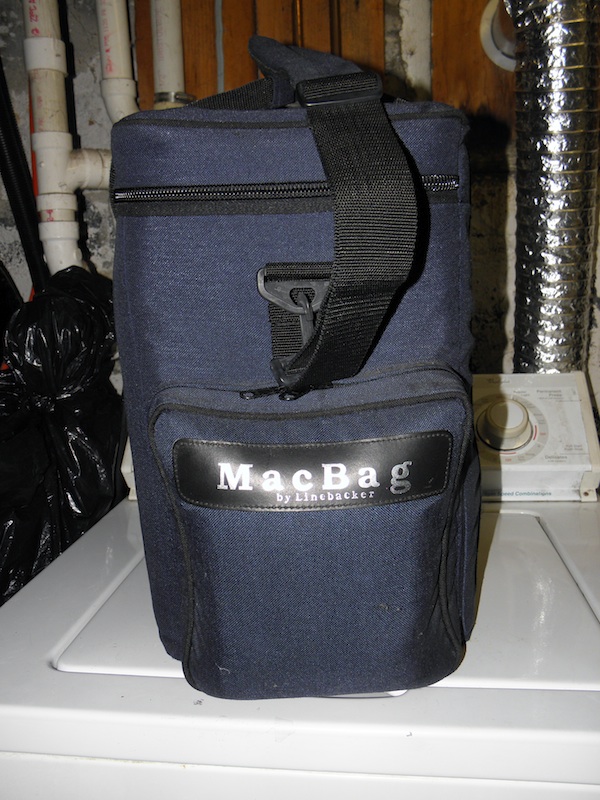
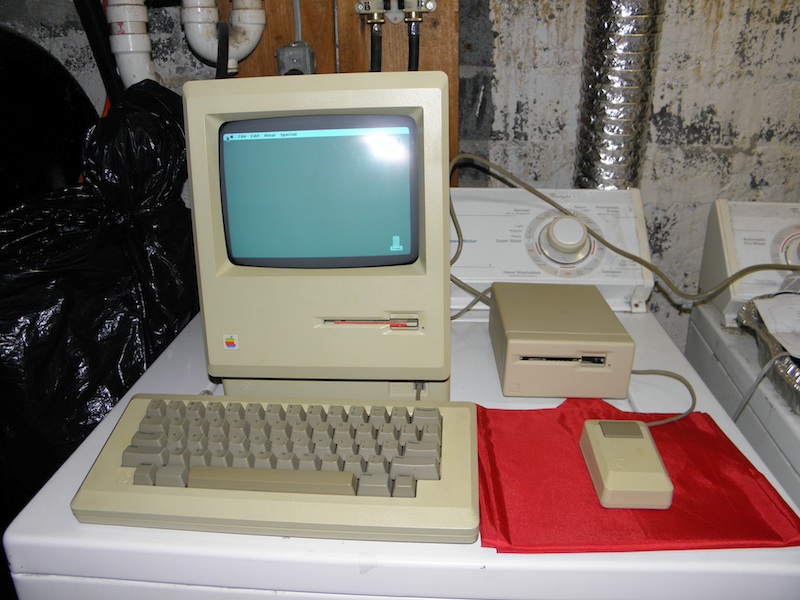
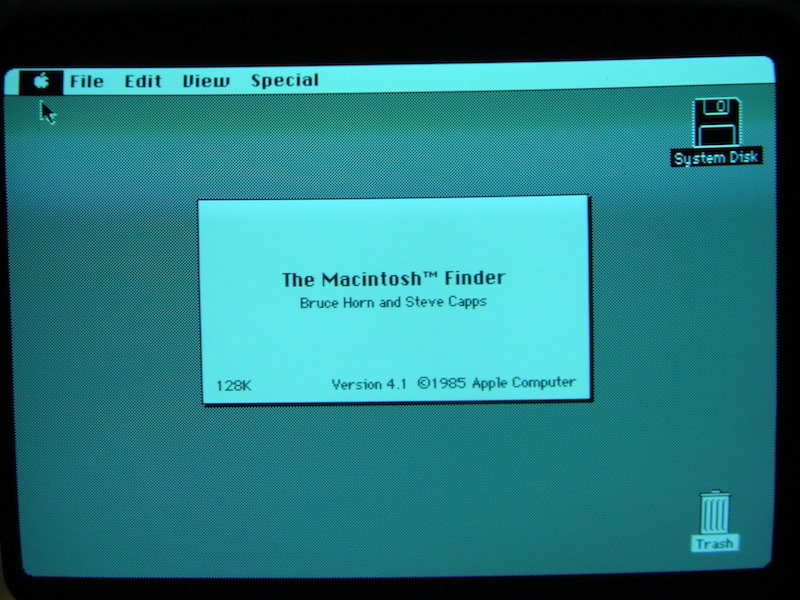
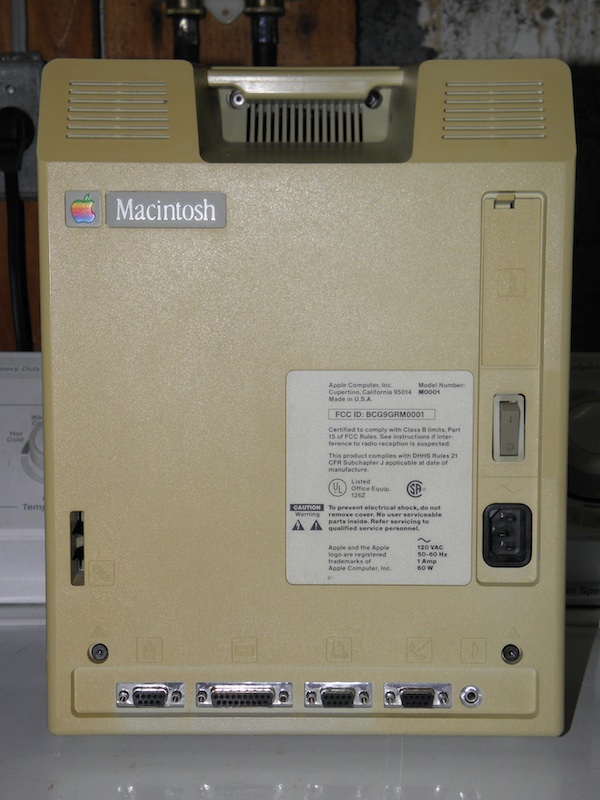
              I have finally acquired an example of what I consider a 'cornerstone' of my vintage computer hoard collection. I wasn't sure I'd ever spot one of these in its original form for a price I could afford, but it popped up at the last MIT Swapfest of the year, and I couldn't resist. Ladies and gentlemen: an original Apple Macintosh 128K! Here are some pictures:

              The carrying bag it came in:


              The computer, plus some accessories:


              "About This Mac" screen showing 128KB of RAM:


              Back panel, showing the plain "Macintosh" badge:


              Not sure how many of these are left which still have only 128KB of RAM. Apple introduced a 512KB version not too long after it was introduced, and offered to upgrade early Macs for a small fee (third-party companies also offered upgrades). Apple did continue to sell a 128KB version for some time after the introduction of the 512K, though they changed the badge on the back to "Macintosh 128K".

              Speaking of 512Ks, I picked up one of those at the swapfest as well. Well, technically, it's a 512Ke, which has some of the same upgrades as the Mac Plus, but it's close enough. Actually managed to get it for free, which offset some of the cost of buying the 128K.
              -Adam
              Goofy music!
              Old tech junk!

              Comment


              • #67
                Speaking of Macintosh computers, I don't know how many folks here still own an older desktop Mac, but if you do..........

                CHECK THOSE PRAM BATTERIES!!!

                I cannot stress this enough. Can I?

                Every 68K or PPC-based Macintosh computer uses what's known as Parameter RAM, or PRAM, to retain various settings like date/time, volume/brightness setting, and other such things. The PRAM is typically powered by the computer, but makes use of a small battery as a backup when the computer is unplugged. Unlike a PC's BIOS battery, the PRAM battery going flat will not cause the Mac to lose its hard drive settings, though some Macs will not boot with a dead PRAM battery. However, it's another aspect of batteries which concerns us collectors, and that's leakage.

                A post on another forum showed what was originally thought to be water damage to the board of an old Macintosh SE/30, but it was eventually proved to be from a leaked PRAM battery, and the board was pretty much destroyed. The type of PRAM battery used in most older Macs (from the II to the PowerMac G5) is a 3.6V lithium "1/2-AA" type which was made by various companies like Maxell, Tadiran, and SAFT. The Maxells seem to be more prone to this leakage than the other types, though I wouldn't entirely trust any of them.

                After seeing the above-mentioned thread, I decided to check the internal battery on some of the Macs I have. First up was my Macintosh Classic from 1990. As soon as I undid the four Torx T-15 screws and started to pull the case apart, I noticed some ominous drips of orange goo from inside. Sure enough, the Maxell PRAM battery had leaked its guts all over the back corner of the board. While not as bad as the SE/30 seen in the above link, it was still pretty nasty.

                I removed the board from the case, pried the battery out of its holder (which is now loose on the board), cleaned off as much of the goo from the board as I could using both vinegar and rubbing alcohol, and left the board to dry overnight. The next morning, I reinstalled the board in its case, powered it up, and got random gibberish on the screen. Fortunately, I'd had the foresight to save various spare parts for these Macs when my high school was junking them. I checked the spare Mac Classic logic board I had, and its battery had been pulled. I installed the spare board in place of the corroded one, put the computer back together, powered it up, and the machine lives again.

                So once again, if you own an older Mac, be sure and check those PRAM batteries, and remove them if possible. If you have a compact Mac like the SE or Classic, you'll need a Torx T-15 screwdriver with a 6" or longer shaft (something like this should do the trick) to open its case. To the best of my knowledge, Mac laptops don't use a conventional PRAM battery, instead using power from the main rechargeable battery pack to store that info (of course, it'd be a good idea to remove that battery pack if it's an old one, since they can leak too). Also, the earliest compact Macs (from the 128K above to the Plus) have the battery compartment easily accessible from the back, and those use an alkaline battery (Eveready 523) which isn't quite as nasty when it leaks, though it should be removed anyway.

                And on the positive side, it isn't entirely likely that the internal battery has leaked. After the ordeal with the Classic, I cracked open my own SE/30 to see if it'd suffered the same fate as the one in the above link. I was relieved to find out that it had a Tadiran battery installed, which was pristine. I removed it, put the unit back together, and it should be good to go (it had problems beforehand, likely related to old capacitors, but that sort of stuff is easier to fix than the results of battery leakage). Good luck!
                -Adam
                Last edited by AdamAnt316; 11-29-2016, 04:22 AM.
                Goofy music!
                Old tech junk!

                Comment


                • #68
                  Just a heads up. You mentioned that it was a 1/2 AA (form factor - can use a different battery size with leads running to the holder) 3.6V lithium battery, and some people might get the wrong impression.

                  Standard lithium primary (non-rechargeable) cells are 3V, and most people's experience with 3.6V lithium cells are lithium ion (rechargeable). There is at least one chemistry of lithium primary cells with a high energy density and long shelf life but not able to produce high currents which runs at 3.6V. Its most common use is (surprisingly enough) parameter maintenance for computers. If you're replacing (not just removing) the battery, be sure to get a 3.6V lithium primary cell.

                  The shelf life of a lithium battery is around 10 years, so any in a Mac would be "past their prime".
                  Any fool can piss on the floor. It takes a talented SC to shit on the ceiling.

                  Comment


                  • #69
                    That's a good point. However, I'm not sure that lithium-ion batteries are available in the 1/2-AA size. Macs have been using lithium primary cells for PRAM retention since 1987, and the most commonly available version today is the Saft LS-14250, though others are available. Numerous examples of these 1/2-AA batteries are available on Amazon, including a 4-pack.

                    However, that wasn't the point of my post. Instead, it was that anyone with an older Mac needs to be sure that it isn't stored for long periods with the PRAM battery in place. I know this warning is probably way too late for anyone whose Mac was equipped with a Maxell-brand battery from the factory, but it's still a good idea to check. Even if the PRAM battery in their Mac hasn't leaked yet, it probably will someday, and these lithium primary batteries can get rather nasty when they do, as I and others have found out the hard way..........

                    ETA: It just occurred to me that there is a Mac which uses a rechargeable (i.e. secondary) battery to retain PRAM information. However, it's not a Mac, strictly speaking; it's the Apple Lisa (as seen in my avatar), which was rebranded as the Macintosh XL late in its short life. The board has a pack containing four Nickel Cadmium AAs soldered to it. While the leakage from those isn't quite as nasty as the lithium type, it's still been known to do a number on them when it occurs, so they should be removed regardless. I got lucky with my Lisa; the batteries hadn't leaked much yet, so I snipped it off from the board, and it doesn't seem any worse for wear.
                    -Adam
                    Last edited by AdamAnt316; 11-30-2016, 04:19 PM. Reason: Added information
                    Goofy music!
                    Old tech junk!

                    Comment


                    • #70
                      In happier news, I recently did some more investigation on my Macintosh 128K, cracking open its case and detailing its innards so that it could be cataloged for the M0001 Registry. As one can expect, it's in beautiful shape inside, complete with the famous signatures on the inside of the back case. Going by the serial number, it was the 5,904th Mac produced during the 41st week of 1984 (not too long before the introduction of the 512K model, I think). Was rather interesting to see how the innards compared to that of the other compact Macs I've opened, like the SE and Classic. Fairly spartan, and not as cramped as the others (particularly the SE/30, which is essentially 10 pounds of computer in a 5 pound case!). Quite the little piece of history.
                      -Adam
                      Goofy music!
                      Old tech junk!

                      Comment

                      Working...
                      X